Anthelixa’s workers
Our workers know how to say no.
What a worker never does, and what it does instead
- Pay an invoice: never. It reads your accounts, it never touches them: the payment stays with you.
- Send an email on your behalf: never. It prepares the draft, a human sends it.
- Create a quote without your approval: never. It prepares the card: the quote is created only after your approval.
- Change its own rules: never. Only a human changes its job description.
- Erase a line from the log: never. Every change stays there: the log accepts additions only.
Everything else, they prepare. You decide.
Not out of politeness: by design. These limits do not depend on what the model is asked: they are written into the platform and into the storage.
The limits specific to your business, for their part, are written into the job description that we write with you, and the worker rereads them in every work cycle.
What they do
The workers, role by role.
Each worker is a role that we build or adjust with you, on your rules. We start from a standard job description: it is faster, and cheaper, than starting from scratch.
Search
It answers your questions about your emails and your documents, attachments and scans included.
What you receive
Pending quotesSearch
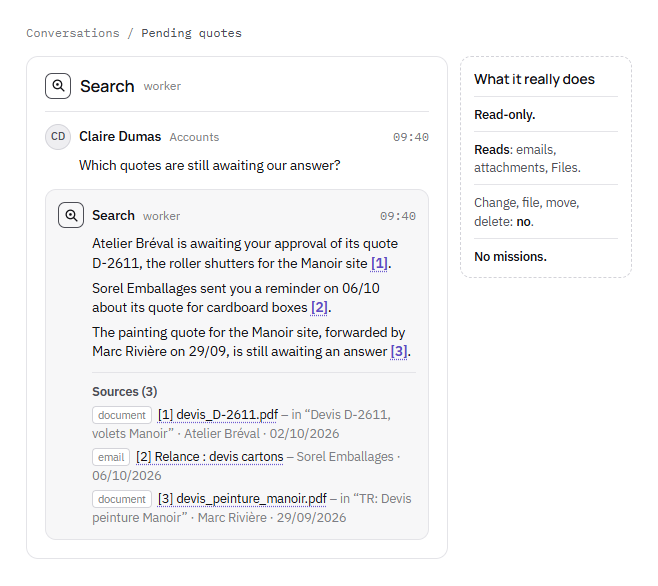
Which quotes are still awaiting our answer?
Atelier Bréval is awaiting your approval of its quote D-2611, the shutters for the Manoir site [1].
The painting quote for the Manoir, forwarded by Marc Rivière on 29/09, is still awaiting an answer [2].
Sources (2)
- document[1] devis_D-2611.pdf – in “Devis D-2611, volets Manoir” · Atelier Bréval · 02/10/2026
- email[2] TR: Devis peinture Manoir – Marc Rivière · 29/09/2026
What it prepares
- Your question
- It reads emails, attachments, scans
- The answer, with its sources
What you decide
What you do with its answer: each piece of information carries a reference, and one click opens the email or the document it comes from.
- What it never does
- Change, file, move or delete an email or a document: it works read-only.
It sorts the administrative inbox and passes each document to the right person.
What you receive
Mail · Administrative inbox
Sorel Emballages08:12
September invoice
Hello, please find attached our invoice for September. Kind regards.
F-24117.pdf
- Recognised
- Supplier invoice
- Passed to
- CDClaire DumasAccounts
Atelier Bréval08:47
New contact for the site
No categoryflagged, for you to decide
What it prepares
- The administrative inbox
- Each document recognised: invoice, notice, reminder
- Passed to the right person
What you decide
Anything that fits no category: it flags it to you, and you decide.
- What it never does
- Reply to anyone outside on your behalf.
Invoicing
It prepares your quotes and your invoices in Pennylane: a quote is created there only after your approval, on a card that shows the customer, the lines and the totals.
What you receive
Manoir quoteInvoicing
Quote to create in Pennylane – SCI du Manoir
- Customer
- SCI du Manoir
- Valid until
- 12/11/2026
| Description | Qty | Total excl. VAT |
|---|---|---|
| Wooden window frames, supply and fitting | 2 | €3,680.00 |
| Removal of the existing frames | 1 | €620.00 |
- Total excl. VAT
- €4,300.00
- VAT
- €860.00
- Total incl. VAT
- €5,160.00
The quote will be numbered as soon as it is created, cannot be deleted, and is not sent.
Create this quote
What it prepares
- Your sales proposal
- The quote, prepared
- The card: customer, lines, totals
What you decide
Your approval on the card, before the quote is created; then the invoice, which you finalise and send in Pennylane.
- What it never does
- Finalise or send an invoice: the one it prepares stays a draft, without a number.
Incoming invoices
On the invoices received as attachments in your Gmail inbox, it records the supplier, the date, the number and the amount; each doubt becomes a task, with a single question.
What you receive
The morning · Questions to settle
Incoming invoices · step “sorting” · Mon 05/10
- Supplier
- Atelier Bréval
- Date
- 02/10/2026
- Amount incl. VAT
- 1,284.00
- Currency
- EUR
- Missing
- the number, misread on the scan
See the document
“The number is hard to read on the scan: F-0931 or F-0937?”
F-0931F-0937Other…
What it prepares
- Invoices received as attachments, in Gmail
- Supplier, date, number, amount recorded
- Each doubt: one task, a single question
What you decide
You settle each doubt by answering the question in its task.
- What it never does
- Write to Pennylane or send an email.
Pre-payment control
It spots the new supplier, holds back duplicates, and holds back the invoice after a change of bank details.
What you receive
Pre-payment control · Invoice held back
Sorel EmballagesHeld back
Invoice F-24203 · €2,916.00 incl. VAT
- Known supplier
- Bank details differ from previous invoices
- No duplicate
New bank details: to be checked with the supplier, on a number already known.
Known contact: Julie Ferrand
Supporting document: the email of 30/09 announcing the change
What it prepares
- The invoice, before it is paid
- Three checks: supplier, bank details, duplicate
- Checked, or held back with the supporting document
What you decide
You decide on each invoice held back; a change of bank details is first checked with the supplier, on a number already known.
- What it never does
- Pay: the payment stays with you.
Request a call backSee its job description, Pre-payment control
Project tracking
It matches each invoice against its accepted quote and keeps track of what is left to pay, work package by work package.
What you receive
Manoir site · Joinery package
Joinery package · Atelier Bréval
- Accepted quote
- €17,200
- Invoiced
- €10,320
- Left to pay
- €6,880
Amounts excl. VAT60% of the quote invoiced
Progress invoice no. 2€5,160.00 excl. VAT
Matched against quote D-2588 · left to pay on the package updated
To approve
What it prepares
- The accepted quotes, package by package
- Each invoice matched against its quote
- What is left to pay on the package, up to date
What you decide
You approve each matched invoice, which reaches you with its quote and what is left to pay on the package.
- What it never does
- Approve an invoice: approval stays with you.
Request a call backSee its job description, Project tracking
SEO
It records the pages of your website, their speed and your positions on the searches you track, then proposes its corrections, which you approve.
What you receive
The morning · Questions to settle
Daily SEO watch · step “propose” · Mon 12/10
- 1
/realisations.html
Title: “Projects” becomes “Restoring old houses: our projects”
- 2
/contact.html
Description too short: rewritten
- 3
/
Image text: “IMG_2041” becomes “Oak staircase”
See the document
“Which ones shall I apply? Reply with their numbers (1, 3), ‘All’ or ‘None’.”
AllNoneOther…
What it prepares
- Your pages, their speed, your positions
- Its corrections, numbered
- A merge request, which you review
What you decide
The corrections to apply, then the merge: it can neither merge nor publish.
- What it never does
- Publish a correction on your website.
These roles are not a fixed catalogue. The Diagnostic says what to hand over, and what to keep: we look with you at where work is waiting, and what part of it a worker can take on.
A job description
No face. A job description.
A worker has neither a first name nor a smile. It has a job description: what it does, what it never does, who it hands over to.
Every job description we write has a “what it never does” section, which the worker rereads in every work cycle.
And it cannot rewrite it: only a human changes a worker’s job description.
Imagine your worker
Answer one question at a time: with each answer, your worker’s job description is written before your eyes. You leave with it: printed, or attached to your call-back request.
The job description is written in your browser, with JavaScript. Without it, request a call back: we will write it with you.
Your answers stay in your browser: nothing is sent until you request a call back.
How they work
Workers that prepare, people who decide
In the morning, the decisions are waiting, each with what the worker has prepared.
A job description
Each worker has its own: what it does, what it never does, who it hands over to.
Rules written in French
The rules live in the job description, in French: you change them yourself, without any development.
Approval before anything is sent
Anything that would leave your company, an email for example, the worker prepares as a draft, and a human sends it.
A log that cannot be rewritten
The log records who changed what, and when, as well as every time a worker or a search reads your mailboxes; it can be exported in full.
Models installed on our server, in France
The platform runs on a server we operate ourselves, in France. An external model is only called with your written agreement.
An answer, with its sources
When a worker answers you in a conversation, each piece of information carries a reference: one click opens the email or the document it comes from.
Building them
A recruitment, not an installation
A worker joins you like a colleague: a job description, a trial period without sending anything, approval in one click, then being made permanent for standard cases.
Weeks 1 and 2
Baseline measurement
We write its job description with your teams: what it does, what it never does, when it hands over.
Weeks 3 and 4
Trial period
It works on your real files without sending anything. Your team compares with what it did itself.
Week 5
Supervised
It acts, and its actions go through one-click approval, entrusted to the person you have designated.
Week 6
Made permanent
It handles standard cases on its own, within your rules. Everything else is escalated, with its file ready.
You see what it does before it does it
What stays yours
With or without us, it is yours
Your job descriptions, your rules and your log remain yours: we hand them over to you in an open format, whether or not you continue.
What sets us apart
We run what we recommend
A consultancy leaves a report
We run what we recommend, and we measure the result in your company.
Software automates within its own scope
The worker works between the tools and the people, where time gets lost.
A hastily connected agent acts with no framework
Ours has a job description, a trial period and a record that cannot be rewritten.
We complement business software, we do not replace it
To start
How you buy it
- Diagnostic
- Fixed feeFully deducted if you install a worker within the following month.
- Building a worker
- Fixed fee, set at the end of the DiagnosticFrom the job description to being made permanent.
- Subscription
- Monthly, per worker, depending on volume and complexityThe platform is included: you pay for the work, not the tool.
- Commitment
- Twelve monthsAt the end of the term, you renew or you stop. Your job descriptions, your rules and your log remain yours: we hand them over to you in an open format, whether or not you continue.
Every price is set before we start. Never on time spent.